FAQs

Do I need an Instron device to calibrate my ELF system?

Question: Do I need an Instron device to calibrate my ELF or WELF?

Answer: No! You can use dead weights and that will work fine. The video calibration tutorial uses one, but it's not necessary.


Link to this FAQ

What maintenance do I need to perform on the F-Scan64?

Sensors should always be disinfected with a 70% Isopropyl Alcohol solution after each use. To do this, slightly dampen a cloth with the alcohol solution, careful not to soak or saturate the cloth. Then wipe the sensor. 

Sensors should always be stored flat in either the system box or some other protective cover. Improper storage can adversely affect sensor life. 

Sensor Replacement/Disposal: Always dispose of sensors in accordance with Regional guidelines pertaining to medical biohazardous waste. 

A sensor can be reused either with different subjects after cleaning (requiring the same size sensor) or during a series of tests with the same subject. Sensor life is reduced if the sensor gets wrinkled or folded during use. 

Link to this FAQ

What happens if I go out of Bluetooth range during data collection?

The Bluetooth™ data transfer has a range of 10 m (30 ft.). If the F-Scan64 subject goes beyond the 10m Bluetooth range, there is a buffer of 16,000 frames (for example: @50Hz, recording buffer up to 5 minutes and 20 seconds) that will be stored on the cuffs. Once the subject is back in range, the user can select the “Transfer Recordings” button to re-connect the devices and transfer the collected recording to the PC.   

Link to this FAQ

How long will F-Scan64 sensors last?

Sensor usage is dependent upon application. Typically, you can expect up to up 20 uses, assuming 20-30 steps per trial in-shoe without orthotics. 


Link to this FAQ

How to improve calibration accuracy and repeatability with ELF?

Issue: After calibration with a known load (via the INSTRON) we get errors of approximately +/-20%. We used different sensors but the error remains the same.

Solution: Make sure the sensitivity is set correctly. (The maximum load should be about 80%-90% of the full range.) Check this before the sensor is calibrated by applying the maximum load and making sure the number that is output (% Digital Output) is between 80-90% on the screen. Since the system uses an 8-bit analog-to-digital converter, this would translate to a “Raw” digital output value of about 200-230 out of a maximum of 255 (8-bit).

In the calibration screenshot below, the "Raw" value is 34 (out of 255) for the highest calibration point.
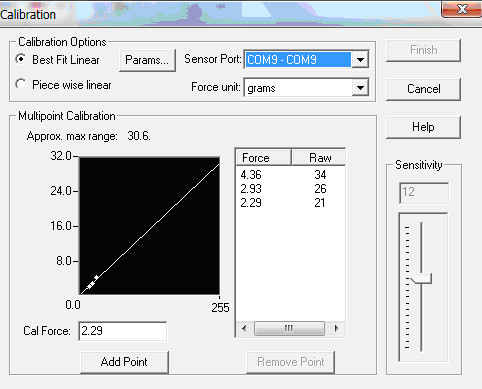
Calibration menu screeshotCalibration menu screeshot

This point, 34 (out of 255) is at the very beginning of the Sensor's curve, which is not very predictable. Since the repeatability error is based on the full-scale value of 255 Raw, you will want to increase the Sensitivity until the load you are measuring will use 80%-90% of the full range.

Link to this FAQ